
Airclub - Flight Deals
Arcadia Labs Inc.Travel & Local
4.678.00 Reviews
- Version
- 1.0.94
- Installs
- 10.00K
- Age Rating
- Everyone
Screenshots





Our Review of Airclub - Flight Deals
 Analysis by Appyee
I find flight hunting gets frustrating when I have a destination in mind but no clear idea of when to go. Airclub - Flight Deals is aimed at that moment: it helps surface flight offers from airports I care about, so I can keep an eye on possibilities without making a fresh round of searches every time I feel like travelling. It is a focused travel app rather than a complete trip planner, and that distinction matters when deciding whether it fits your habits.
Start with the airport, not just the destination
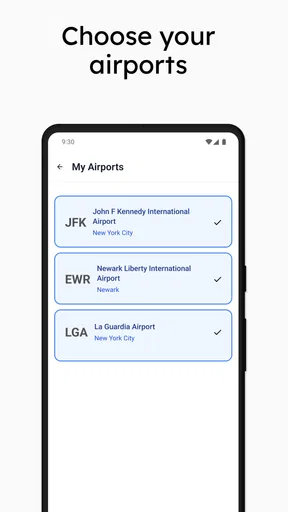
For me, the most useful way to approach a flight-alert app is to begin with the airports I can realistically use. A cheap fare is less compelling if getting to its departure airport means an expensive extra journey or a difficult travel day. Before relying on an alert, I would make a short list of nearby airports I would genuinely consider, then compare the offers against the full door-to-door effort, not only the airfare.
This is where Airclub’s focus on alerts from your airports can be practical for flexible travellers. If I am open to several destinations, I can watch for opportunities rather than repeatedly searching one route. If I have fixed dates, a specific airport, and one destination in mind, a conventional flight search may be more direct. The app makes most sense when I have room to adapt my plans around a worthwhile fare.
Where setup and expectations can trip you up
The idea of an alert sounds simple, but it only helps if the airports and destinations I choose reflect how I actually travel. I would avoid adding places I would never visit just to see more offers; that can turn useful notifications into background noise. Start with a small set of realistic options, notice which alerts are relevant, and refine from there. That is a more helpful test than enabling everything at once.
It is also worth treating an alert as a reason to check a fare, not as a promise that the whole trip will be convenient. Before committing, I would review the travel dates, departure and arrival airports, journey length, and any connection that matters to me. A low headline price does not settle questions such as whether the timing works with my schedule or whether I can reach the airport comfortably.
Recovering when an alert does not lead to a booking
If an offer is not useful, I would first check whether it conflicts with my dates, airport preferences, or tolerance for a longer journey. Then I would adjust the search choices rather than assuming the app has failed. For someone who can travel on different days, keeping a broader window of possible trips in mind may make deal alerts more actionable; for someone with strict dates, checking a standard search alongside the alert is a sensible cross-check.
When a fare catches my eye, I would move from discovery to verification before making a decision. Confirm the itinerary and conditions on the booking screen, and compare the final total with the value I expected from the alert. That small pause can prevent an appealing first impression from overshadowing details that matter to the actual trip.
Finding the Best Deals
The first thing I noticed was how easy it is to navigate. Once I fired up the app, I was greeted by a clean interface that didn’t overwhelm me with unnecessary information. It was like the app knew I just wanted to find the best deals without dealing with a cluttered screen.
With Airclub - Flight Deals, you get access to a treasure trove of discounted flights. The app aggregates deals from various airlines, so you don’t have to hop from one airline’s website to another. It’s kind of like having a secret insider looking out for your travel budget!
Personalized Alerts
One feature that really stood out to me was the personalized alerts. I set up notifications for specific destinations I was interested in, and the app kept me in the loop whenever a deal popped up. Imagine getting a ping about a crazy cheap flight to Bali right when you're contemplating your next getaway. That's the beauty of it!
Setting up these alerts was a breeze. I didn't have to dig through layers of settings; it was all quite intuitive. I appreciate apps that respect my time, and this one does just that.
Making alerts work in everyday travel planning
A realistic use for me is a loosely planned weekend or holiday: I decide how much time I can take off, keep a few destinations in mind, and let a promising fare help narrow the choice. That is different from waiting for an alert and immediately buying. I still need to check whether the trip fits my calendar, whether the airport is practical, and whether I would enjoy the destination enough to make the travel worthwhile.
For a family visit or a work trip with fixed dates, I would use Airclub as a supplementary watch rather than my only search method. A deal alert can be useful context, but it cannot replace checking the exact itinerary that meets a non-negotiable schedule. This is one of the key trade-offs: flexibility helps the app’s discovery approach; rigid plans call for more targeted comparisons.
I would also decide in advance what counts as a genuinely good deal for me. That does not need to be a precise fare target. It can be a personal rule such as avoiding overnight connections or refusing an airport that adds a long ground transfer. Knowing those boundaries makes it easier to respond calmly when a notification arrives, instead of letting urgency make the decision.
User Experience
Let’s talk about the overall user experience. I’m a sucker for apps that don’t require a PhD to figure out, and Airclub - Flight Deals is definitely user-friendly. The design is sleek and modern, but more importantly, it’s functional. Everything is just a tap away, and I didn’t encounter any hiccups or crashes.
The app also offers a smooth booking process. Once you find a deal, you can book directly through the app. No redirects or opening new browser tabs – it’s all streamlined to make your life easier.
When the app is not the cause of the friction
A disappointing result is not always a setup problem. Fares and availability can change, and a route that looked tempting may no longer fit once I check the exact travel details. I would treat an alert as a prompt to investigate promptly, while still taking time to confirm the itinerary. If a price or option changes during that process, comparing the current choices is more useful than assuming the notification guarantees the same terms later.
There is also a difference between finding a low fare and finding the best trip. A longer journey, awkward departure time, or inconvenient airport may make an apparently cheaper option a poor fit. I weigh those costs against the savings rather than judging an offer by its headline alone. For a traveller who values a particular airline or needs a tightly timed connection, a direct search with those requirements in mind can be the better tool.
Airclub is free to download, with in-app purchases listed from $9.99 to $39.99 per item. I would check what an optional purchase covers and whether it adds value to my own travel routine before spending anything. The free starting point is useful for trying the basic approach; the right choice depends on whether the app’s alerts actually change how often I find suitable trips.
Exploring Additional Features
Apart from being a deal-finding powerhouse, Airclub also includes some nifty features for the savvy traveler. They have a ‘Discover’ section, which is perfect for those times when you’re open to suggestions. It throws out spontaneous ideas based on trending deals, and I found myself daydreaming about places I hadn’t even considered before.
Another feature worth mentioning is the ability to filter searches based on preferences like layovers, travel time, and even specific airlines. It’s quite handy, especially if you’re picky about how you want to travel.
Who will get the most from it
I would recommend it most to people who can be spontaneous, have more than one acceptable destination, or enjoy keeping an eye on flight possibilities before choosing where to go. It can also suit a traveller who already knows which departure airports are realistic and wants deal discovery to be part of a broader planning routine. In those situations, alerts can reduce the effort of revisiting the same searches.
I would be less likely to rely on it if I needed an exact route on fixed dates, had strict requirements around departure times, or wanted one place to coordinate an entire holiday. A general flight-alert tool is not a substitute for checking baggage arrangements, lodging, ground transport, or every condition attached to a ticket. For those needs, I would pair it with targeted flight comparisons and separate planning tools.
Compared with manually checking airline sites, Airclub offers a more convenient way to notice possibilities across airlines, while a direct airline search is still useful for confirming the final itinerary and terms. Compared with broad travel-search services, its appeal is the deal-alert angle rather than managing every part of a trip. I see it as a discovery layer, not as the only place I would verify a purchase.
For practical setup, I would begin with the airports I can reach, choose a few destinations or travel possibilities that matter, and allow the alerts to prove their usefulness before widening the net. If notifications feel irrelevant, I would narrow the choices; if they are too restrictive, I would reconsider which nearby airports or destinations I am willing to accept. This simple adjustment keeps the signal useful without turning travel planning into another stream of noise.
What to expect before installing
Airclub is a free Travel & Local app from Arcadia Labs Inc. Its average rating is 4.7 from around 1,700 ratings, and it has more than 10,000 installs. It is rated for Everyone, version 1.0.80, and requires Android 7.0 or later. Those details make it easy to judge basic compatibility, while the main practical question is whether flight alerts suit the way I plan trips.
If I were troubleshooting a first run, I would check the simple things first: confirm the app is up to date, revisit the airports and destinations I selected, and make sure the phone’s notification settings allow alerts if I expect to receive them. If results still do not match my plans, I would refine the choices and compare a specific itinerary elsewhere before booking. Those steps are general checks, not a guarantee that every issue comes from the app.
One question people often have is whether they should wait for a notification before searching. I would not. For flexible travel, alerts can help surface an option I might otherwise miss, but checking alternatives remains sensible when dates or route details matter. Another common concern is whether a low fare means a low-cost whole trip; I would always consider airport access, journey timing, and the itinerary alongside the fare.
And if I am wondering whether it is worth keeping installed, I would judge it by relevance rather than by how many notifications arrive. A few useful leads can be more valuable than a busy feed, especially if I am only planning occasional trips. If my travel plans are rare or highly specific, I may get more value from searching when I need a ticket instead of maintaining alerts year-round.
Final Thoughts
If you’re like me and love to travel without breaking the bank, Airclub - Flight Deals is a must-have. It takes the stress out of finding affordable flights and lets you focus on what really matters – planning your adventure. The app is a trusty companion that delivers on its promise of finding amazing deals, and I couldn’t be more pleased with my experience.
So, are you ready to snag that dream trip without burning a hole in your wallet? Grab your phone, download the app, and let Airclub - Flight Deals work its magic. Safe travels!
Verdict
Strengths of Airclub - Flight Deals
- Real-time flight deal alerts.
- User-friendly interface design.
- Customizable deal notifications.
- Wide range of airline options.
- Frequent updates on new deals.
Limitations of Airclub - Flight Deals
- Limited to certain regions.
- In-app ads can be intrusive.
- Requires internet connection.
- No option for hotel bookings.
- Occasional app crashes.
Similar Picks in This Category
View All
Google Maps
Google LLC3.4

Google Maps Go
Google LLC4.1

Booking.com: Hotels & Travel
Booking.com Hotels & Vacation Rentals4.8

Google Earth
Google LLC3.8

Skyscanner Flights Hotels Cars
Skyscanner Ltd4.8

trivago: Compare hotel prices
trivago N.V.4.4
Frequently Asked Questions
What is Airclub - Flight Deals and how does it work?
Airclub - Flight Deals is an app designed to help users find and book the best flight deals available. By aggregating various airline offers and discounts, it provides users with options to save money on flights. The app monitors price trends and alerts users to the best times to book, ensuring they get the most value for their money.
Is Airclub - Flight Deals free to use, or are there any hidden fees?
Airclub - Flight Deals is free to download and use. While the app itself does not charge fees for browsing deals or setting alerts, users should be aware that booking through the app may lead to third-party websites, which may have their own fees or charges. Always check the final price before confirming a booking.
Can I book flights directly through Airclub - Flight Deals?
No, Airclub - Flight Deals does not handle bookings directly. It serves as a platform to find the best flight deals and redirects users to the respective airline or travel agency websites to complete the booking process. This ensures that users can take advantage of the most current and direct offers available.
How accurate are the flight deal alerts from Airclub - Flight Deals?
Airclub - Flight Deals is known for its accuracy in monitoring price trends and notifying users of significant changes. The app uses real-time data to provide timely alerts. However, flight prices can fluctuate rapidly, so it’s recommended to act quickly upon receiving an alert to secure the best deal.
Does Airclub - Flight Deals support multi-city or round-the-world itineraries?
Currently, Airclub - Flight Deals focuses primarily on single-route flights and round-trip tickets. While it excels in finding deals for these types of itineraries, users looking for multi-city or round-the-world trips may need to use additional resources or contact airlines directly for the best options.
